
How to manage monthly budget / expenses using Google Spreadsheet
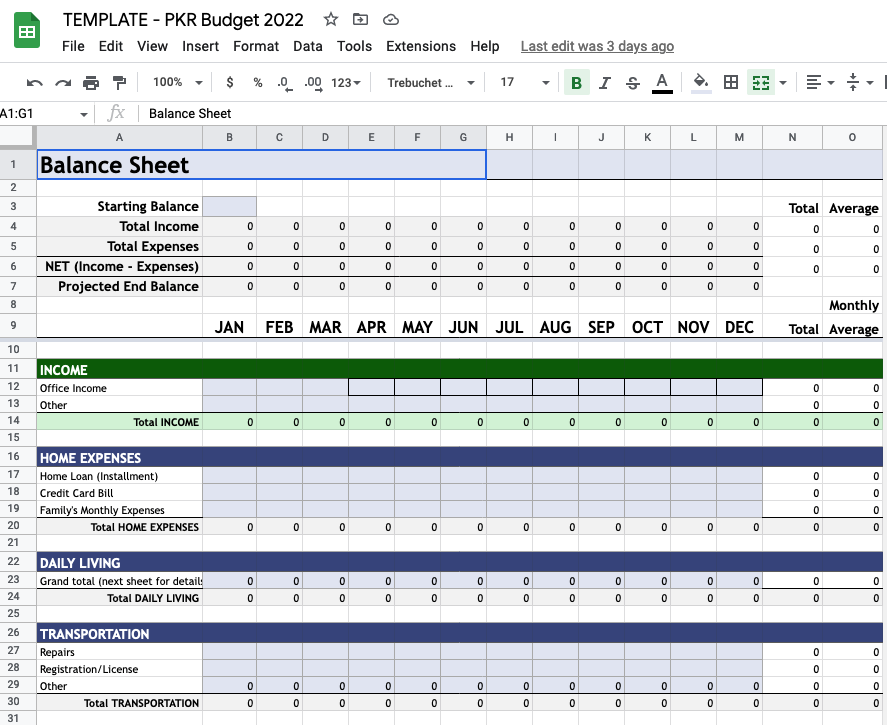
I used to have this problem of not knowing by the end of the month where my money go. I started looking into budgeting mobile apps but they didn't have what I was looking for. For the time-being, I started writing my daily expenses to Google Keep notes app and also started using a Google Spreadsheet template where I could write income and total expenses for the month, divide them into categories like daily living, credit card bill, home financing, vacation, education, etc.
I have been using this spreadsheet for more than 10 years now, doing slight modification every now and then.
The budget spreadsheet
Here is the sheet: https://docs.google.com/spreadsheets/d/1ldAmwEoysyuZlZbUJkzxDAMh2xOj8waHs-gDHoYJKYI/edit?usp=sharing
Feel free to make a copy in your drive and make changes once you gain understanding of how it works.
How it works:
- Statistics sheet is automatically populated. you don't need to modify anything unless you want to add/modify graphs/charts.
- Budget sheet is where all the calculations happen. But this was not enough for me because I wanted to keep track of all my expenses (not just the daily figure or category).
- Start with writing your current starting bank balance at B3 of Budget sheet so that it could correctly project your average monthly and total savings.
- Then on every month, you write your salary/income in B12 (till M12 depending on the month). If there is any other source of income for one specific month (example: tax return), then write it in B13 (other income).
- In Home Expenses table, only Credit Card Bill is populated from the other sheet. So you can modify other two categories' name, just make sure not to mess up the calculation.
- All the other tables are automatically populated from Detailed Expenses sheet.
- Start with writing your current starting bank balance at B3 of Budget sheet so that it could correctly project your average monthly and total savings.
- Detailed Expenses sheet is where you write your day to day spending.
- Things like grocery, petrol, bills and anything else that doesn't lie in a different category goes to DAILY LIVING category. I have added conditions that changes colors when you write "grocery" or "bill" there. so that they could be correctly picked up in the graphs.
- Anything related to maintenance, purchase, sale of your car goes inside CAR EXPENSES. If you sold your car, you have an option to either write it in Other income, or note it in car expenses by writing the price in negative. (Example: CAR EXPENSES table: sold my corolla, -1000000)
- Medical expenses if obvious, you can write health insurance expenses (if any) here as well.
- CREDIT CARD BILL is kind of tricky. If you capture all your expenses including the ones made using credit card, then you don't have to write anything in your credit card bill because you have already noted those expenses individually.
- All other tables are obvious.
- Things like grocery, petrol, bills and anything else that doesn't lie in a different category goes to DAILY LIVING category. I have added conditions that changes colors when you write "grocery" or "bill" there. so that they could be correctly picked up in the graphs.
Writing expenses from smartphone
First few months will be tough because you will have to remember putting all expenses in the sheet at the end of the day (or instantly when you do it).
If you are an Android user, you can make a shortcut of this google spreadsheet on your home screen.
If you are an Iphone user, mark this spreadsheet as favorite in google drive (starred). Then add Google Drive panel on the left home screen where you put all the dashlets (idk what to call them). If you open the sheet couple of times from there, it will start showing up there by default.
Let me know if you have any questions in the comments and I will try to respond as soon as possible.


Comments ()